Take a photo
Tap Scan Food and photograph your plate, or pick a photo you already took.
AI calorie counter
Point your camera at a meal. C for Calories identifies the foods, estimates portions and gives you calories, protein, carbs and fat for each item, for free.
How the AI works
Tap Scan Food and photograph your plate, or pick a photo you already took.
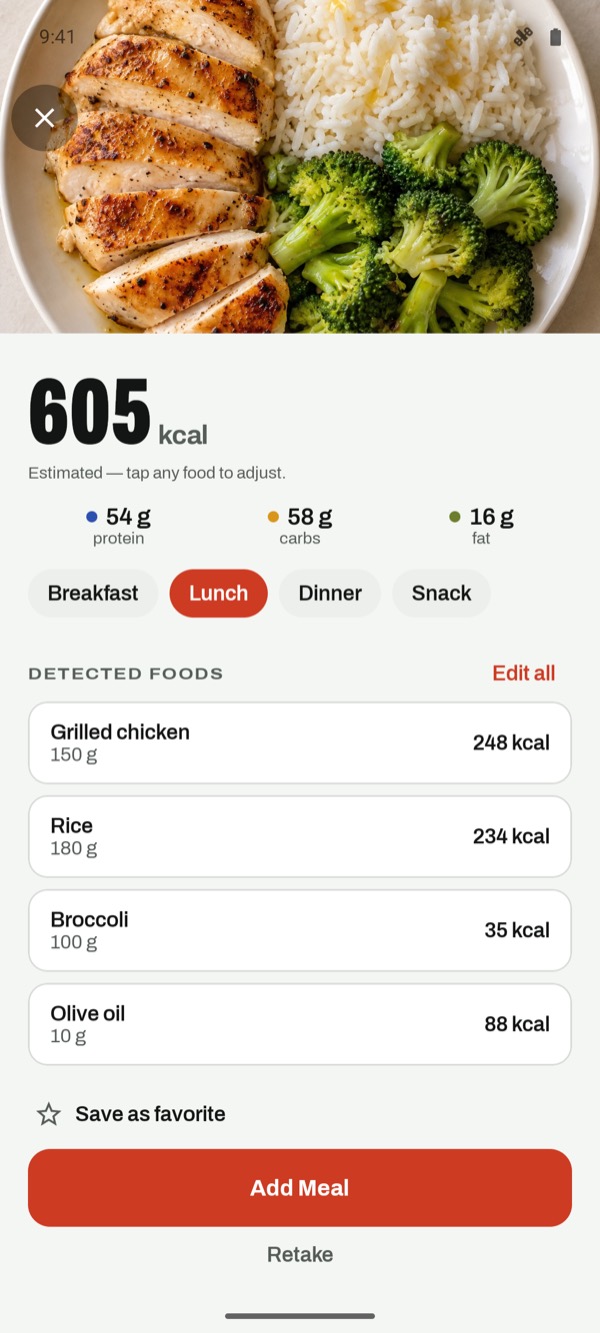
See each food with its weight, calories, protein, carbs and fat. Tap any item to change the amount or swap the food.
Choose breakfast, lunch, dinner or snack. Your daily totals and remaining calories update straight away.
What you get back
The AI doesn't hide its working. You see every food it found and how much of each it thinks is on the plate. If it reads your rice as 180 g and you know it was closer to 250 g, change it and every total updates.
Lunch, from a photo
Grilled chicken · rice · broccoli · olive oil
Estimated. Tap any food to adjust before you save.
More detail: Are AI calorie counters accurate? and how to take a photo that gives a better estimate.
Also free
FAQ
Yes. AI photo scans are free in C for Calories, with no trial.
It identifies the foods in the photo, estimates the weight of each portion, and calculates calories, protein, carbohydrates and fat for every item and for the whole meal.
Always. Every detected food can be changed: adjust the grams, swap the food for a better match, remove it, or add something the camera couldn't see.
It works best with foods that are clearly visible. Mixed dishes, sauces and regional recipes are estimated from what the photo shows, so check the items and amounts before saving.
Yes. C for Calories is on Google Play for Android 7.0 or later, and on the App Store for iPhone and iPad with iOS 15 or later.
Free download
Download C for Calories for free on iPhone, iPad or Android. Every tracking feature is included.