Take a photo
Tap Scan Food and photograph your plate, or pick a photo you already took.
Calorie counter by photo
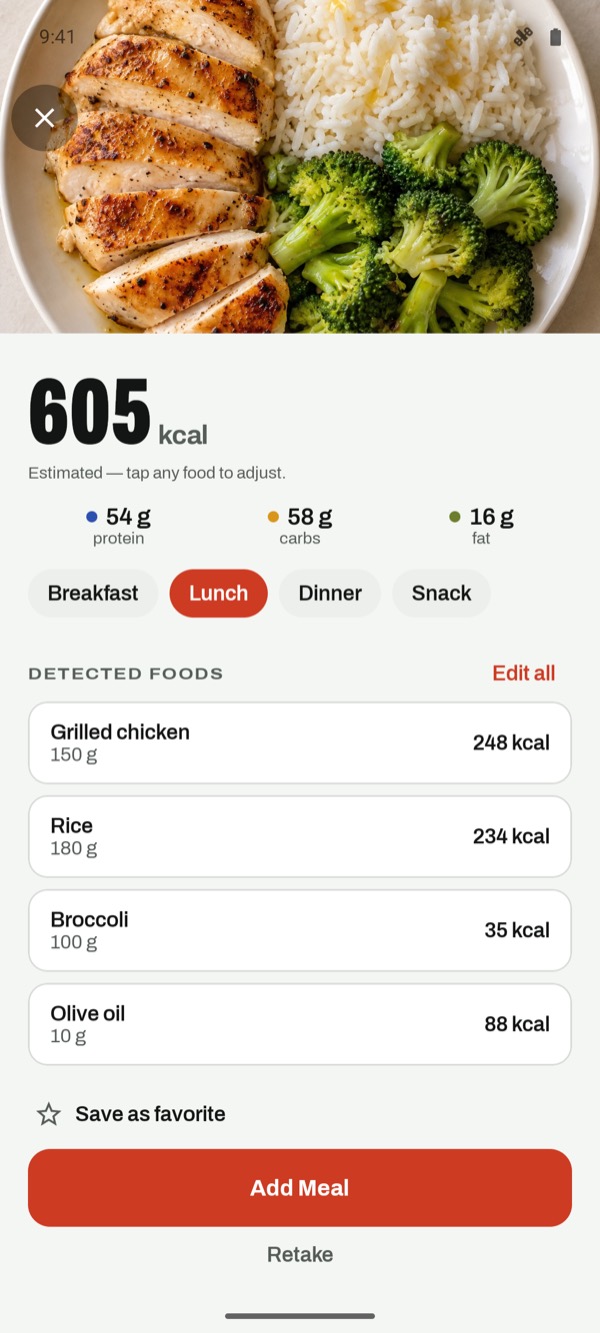
Take a picture of your plate and get calories and macros for every food on it. Check the estimate, fix anything in a tap, and save. Free, with no trial and no account.
Calorie counter by photo
Typing every ingredient of a home-cooked dinner is the moment most people give up on counting. A photo gets you a complete, editable draft of the meal in seconds.
Tap Scan Food and photograph your plate, or pick a photo you already took.
See each food with its weight, calories, protein, carbs and fat. Tap any item to change the amount or swap the food.
Choose breakfast, lunch, dinner or snack. Your daily totals and remaining calories update straight away.
Better photos, better numbers
Photo, then perfect
Every item shows its estimated weight. Change it and calories and macros recalculate.
Brown rice instead of white? Pick the right food and keep the portion.
Butter in the pan or dressing on the salad: add it from search or Quick Add.
Eat it often? Save it once and log it again later with a tap, no new photo needed.
FAQ
Yes. C for Calories estimates calories and macros from a photo of your meal. It's an estimate, not a lab measurement, so the app shows each food and its weight for you to check.
C for Calories does it for free, with no trial and no account.
Yes. Take a new photo or choose one from your photo library.
No. A resized copy is sent for analysis and isn't stored by our service after the estimate is returned. If you save the meal, the photo is kept only on your phone. See the Privacy Policy for details.
Add the missing food from search, adjust any amount, or remove an item. The totals update as you edit.
Free download
Download C for Calories for free on iPhone, iPad or Android. Every tracking feature is included.